

Case Studies Regional Bank

How a Regional Bank Automated Mobile App Security Testing Behind MFA with Ostorlab

A regional bank's security scans all stopped at the same screen: "Enter the code we sent to your phone."

Everything behind the login, from checking a balance to sending money, was only tested twice a year by outside pentesters.

Now Ostorlab gets past that screen on every new version of the app and tests 212 screens behind the login. In the first full scan, it caught a missing check when adding a new recipient, and the bank fixed it in 11 days.

iOSAndroidTesting behind MFAAgentic Deep ScanCI/CD integrationPSD2
Results
212
screens tested behind the login, per scan
12 of 12
app versions tested behind the login since the first full scan
11 days
time a security gap behind the login stays open, down from 6 months
The challenge

The bank releases a new version of its apps every two weeks, and its security scanner checked each one.

But the scanner could only type a password. It could not receive the SMS code, so it never got past the login.

That left it 9 screens to test, all before the login. Accounts, transfers and cards, where the money is, were only tested by outside pentesters, twice a year.

The approach
Week 1

Setup

Ostorlab support gave the bank a phone number used only for testing.

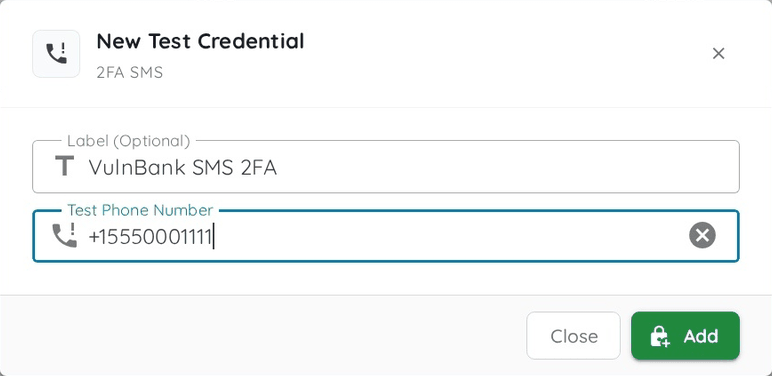
The bank linked it to two test accounts, one personal and one business, and added the number in Ostorlab as a 2FA SMS test credential.

Adding a 2FA SMS test credential in Ostorlab, with the testing phone number
Adding the testing phone number as a 2FA SMS test credential. Shown on VulnBank, a deliberately vulnerable demo banking app.
Week 2

The first full scan

The third scan received the code, typed it in and logged in.

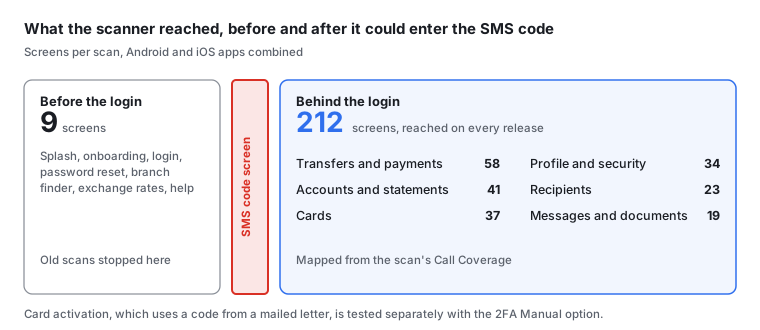
Ostorlab's Call Coverage, which shows every screen a scan visited, showed how far it got:

Before: the scanner reached 9 screens and stopped at the SMS code screen. After: 212 screens behind the login, across accounts, transfers, recipients, cards, profile and messages
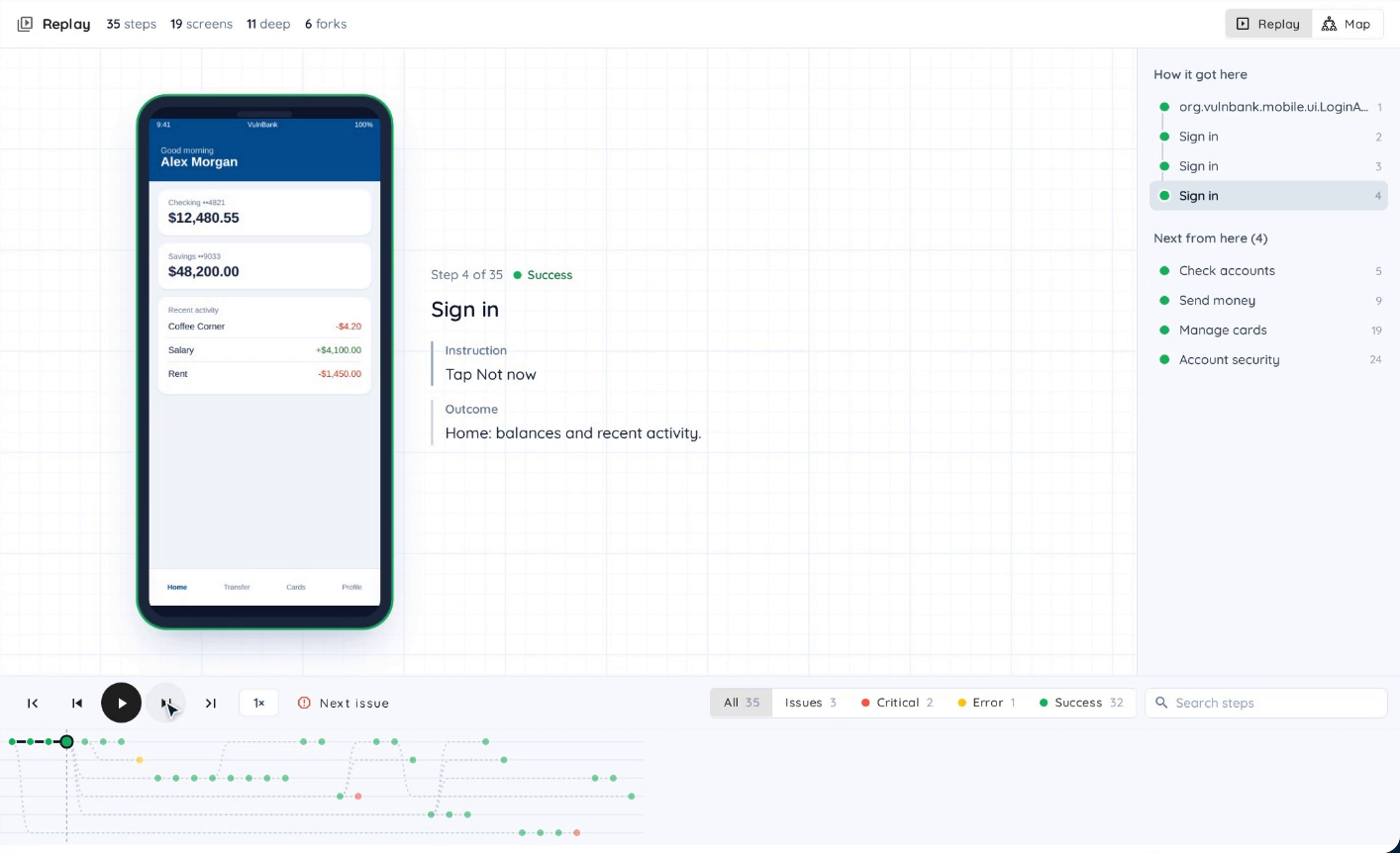
Ostorlab's Call Coverage replay: the scan has signed in and reached the home screen, with accounts, money transfers, cards and security as the next steps
Call Coverage replays each step of a scan. Here the scan first tried a wrong password, then signed in with the test account and reached the home screen, with accounts, money transfers and cards next. Shown on VulnBank, a deliberately vulnerable demo banking app.
Since then

Automatic authenticated scans on every new version

The scan runs automatically on every new version of the app. It gets a fresh SMS code each time, and nobody has to type it.

What testing behind the login found

Once logged in, Agentic Deep Scan, Ostorlab's AI pentest, looked for what an attacker would: an SMS code it could skip, or a request the app would block but the server would still accept.

Every issue it confirms comes with a working exploit, so the bank's developers could see the attack work for themselves before fixing it.

Three results from the first months:

High

Adding a new recipient skipped the extra SMS code

The app asked for the code, but the server didn't check it. The bank's rules, based on PSD2, require that code.

The bank added the missing check on its server 11 days after the scan, well within its 30-day deadline for high-severity issues. Ostorlab's retest confirmed the fix, and the bank's logs showed nobody had used the gap.

Without a scan that gets past the SMS code, it would have stayed open until the next pentest, up to six months later.

How it was proven

From a logged-in test account, the scan added a test recipient with no code. It appeared in the account as trusted.

Medium

Logging out didn't fully log you out

The app forgot the login, but the server would still accept it for 30 days.

How it was proven

The scan logged out of a test account, then used its old login two hours later to get back in.

Not exploitable

The code screen looked like it allowed unlimited guesses

It gave no sign of a limit on wrong codes.

How it was proven

The scan tried guessing and found a hidden limit: 5 wrong codes locked the test account for 30 minutes. Nothing was reported to the developers.

Impact
BeforeAfter six months
Screens tested in each scan9, all before the login212 behind the login, plus the same 9 before it
App versions tested behind the login1 in six months, by the pentesters12 of 12 since the first full scan
Outside pentests per year22

The bank still has its two pentests a year.

They now start from a version that has already been tested behind the login, so the pentesters can spend their time on new features.

Workflow Recap
1

Ostorlab support assigns a phone number used only for testing, and the bank links it to its test accounts

2

Each new version of the app is scanned automatically, and the scan logs in with a fresh SMS code

3

Agentic Deep Scan tests the screens and requests behind the login, and backs each confirmed finding with a working exploit

4

Developers replay the exploit, fix the issue, and Ostorlab's retest confirms the fix

5

The two yearly pentests focus on new features

The bank's scanner had been checking every new version, but only the 9 screens in front of the login.

Now that the scans enter the SMS code themselves, they reach the accounts, transfers and cards behind it. The bank fixes what they find within days instead of waiting for the next pentest.

The business portal, which uses an authenticator app instead of SMS codes, is next, with the same setup.

Get Started

Test your app behind its login

If your scans stop at a login code screen, Ostorlab can get past it with SMS, email or authenticator app codes and test what your customers actually use.

Book a Demo